I'm glad to hear it's been useful for you


Due to Google policies, MSDroid is effectively dead so I'm scratching an itch with a web browser based app for tuning Megasquirt and Speeduino
type ECUs. I need data to test the auto VE tuning aspect. If you have a reasonably well tuned setup, can you please send me you MSQ and MSL files?
I want to feed them through and check it doesn't do much.
If you can help, please send them to dave.g.smith@gmail.com
Regards,
David
quote:
Originally posted by scudderfish
Due to Google policies, MSDroid is effectively dead so I'm scratching an itch with a web browser based app for tuning Megasquirt and Speeduino type ECUs. I need data to test the auto VE tuning aspect. If you have a reasonably well tuned setup, can you please send me you MSQ and MSL files? I want to feed them through and check it doesn't do much.
If you can help, please send them to dave.g.smith@gmail.com
Regards,
David
Dead in the way that it can no longer be updated. Because of the way it works Google autorejects any update that gets uploaded and making it
compatible with their new rules is a huge undertaking. If you have it installed and it does what you need, then no need to worry; there just will nor
be any more changes made to it.
I'm glad to hear it's been useful for you
Can't you just sideload? I do this for a bunch of apps. Obviously the browser route is maybe better from an end user perspective, though I always
find browser based anything challenging. (I'm just curious/nosey, I have no dog in the race).
[Edited on 14/1/2026 by coyoteboy]
quote:
Originally posted by coyoteboy
Can't you just sideload? I do this for a bunch of apps. Obviously the browser route is maybe better from an end user perspective, though I always find browser based anything challenging. (I'm just curious/nosey, I have no dog in the race).
[Edited on 14/1/2026 by coyoteboy]
I would say that sideloading is the best option for retaining compatibility, but google are trying to kill that by requiring any android device that
uses Google play services to use only signed apk's, which require the same level of developer registration etc as submitting an app to the play
store, this is rolling out worldwide by next year.
It won't matter to those who use versions of Android that don't use Google play services, but that only makes up a few percent of android
users.
Fdroid might be another avenue to approach making the app available from a storefront, the principle of the fdroid store is FOSS, but iap and donate
options within an app are acceptable.
I do use msdroid mostly for data logging and for making small adjustments, i tend to use megalogviewer to filter and make changes to the maps. I do
sometimes use the msdroid dashboard layouts when trying to find issues that I can't spot directly in the logs.
With your webpage implementation, is it going to rely on an external backend, or will it be useable as a "portable app" and downloadable to
a local device?
I'll send you some msq/msl files to have a look at and try out.
Dave
The website will be effectively a static page with no communication with any server. Once it's loaded in the browser there is no network
requirement. I'm also going to put a service worker into it so it will possibly work fully offline as well (once you've visited it once to
initially load it)
Thank you so much for the files.
Regards,
David
I thought I'd update here. I ran obfripper's files and sent back what my code found which looked roughly sensible, but I then realised
that it was using the lambda delay table I had generated for my car from a pile of log files. I then changed the code to calculate the 3x3 lambda
delay table from the log file as it was processing it. This resulted in a small change to the original analysis, but it gives me more confidence in
the values. It does mean that I can't do a like for like comparison with MegaLogViewer as that uses a static predefined LD table.
Regards,
David
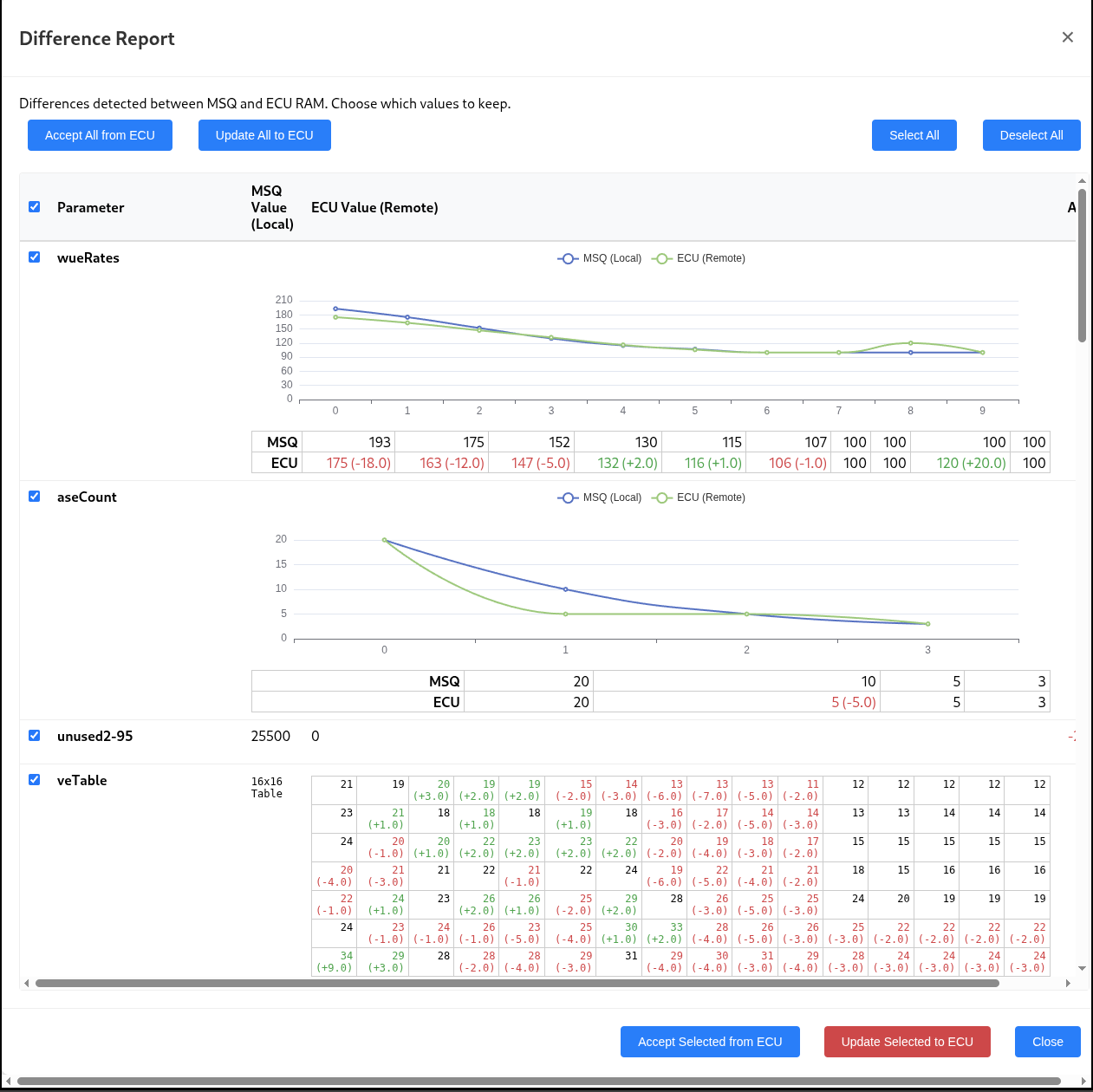
One of the nice things about doing this is I can fix the things that annoy me in TunerStudio 
Top of the list is the tune difference dialog. I can never see the differences in the tables or curves, so this app will show delta tables and draw
both curves together. You can also select which fields you're going to select as well.

Difference Report
Ah, the joy of LCB images. Here is a legible version
It's alive!
https://vetuner.smithfamily.org.uk
Absolutely, positively guaranteed not to work or your money back!
Seriously, the only ECU this has seen so far is one I have on my bench running Speeduino. Definitely Here Be Dragons.
I've had a quick glance at the site, it doesn't appear that I will be able to use it with android devices as web serial api is not available
in any of the browsers i have (firefox and various chrome based, 138-144), and is for usb-serial devices, not bluetooth ones.
It appears that there is an upcoming update to android chrome that will allow bluetooth web serial api usage though, it's approved but has no
date to ship though.
https://cr-status.appspot.com/feature/5139978918821888?gate=6303617830879232
I'll have a look at it with the laptop later, the car is packed away at the moment, but I have an old ms1 that I can test it with, iirc I have
both serial and bluetooth options there to test.
Dave
My plan is ultimately make a little ESP32 based widget that plugs into the ECU which sets up a Wifi point, serves the software and talks websockets to the browser. Then any browser on any platform will work with it. However Chrome on Desktop is easy to test the underlying logic before throwing that into the mix.
I've had a quick go with the old ms1, it doesn't seem to pick up the local serial port as an option for connection, i have fired up
tunerstudio and checked it is otherwise ok with no issues.
It also doesn't like my msq, and brings up "error loading MSQ" as per below:
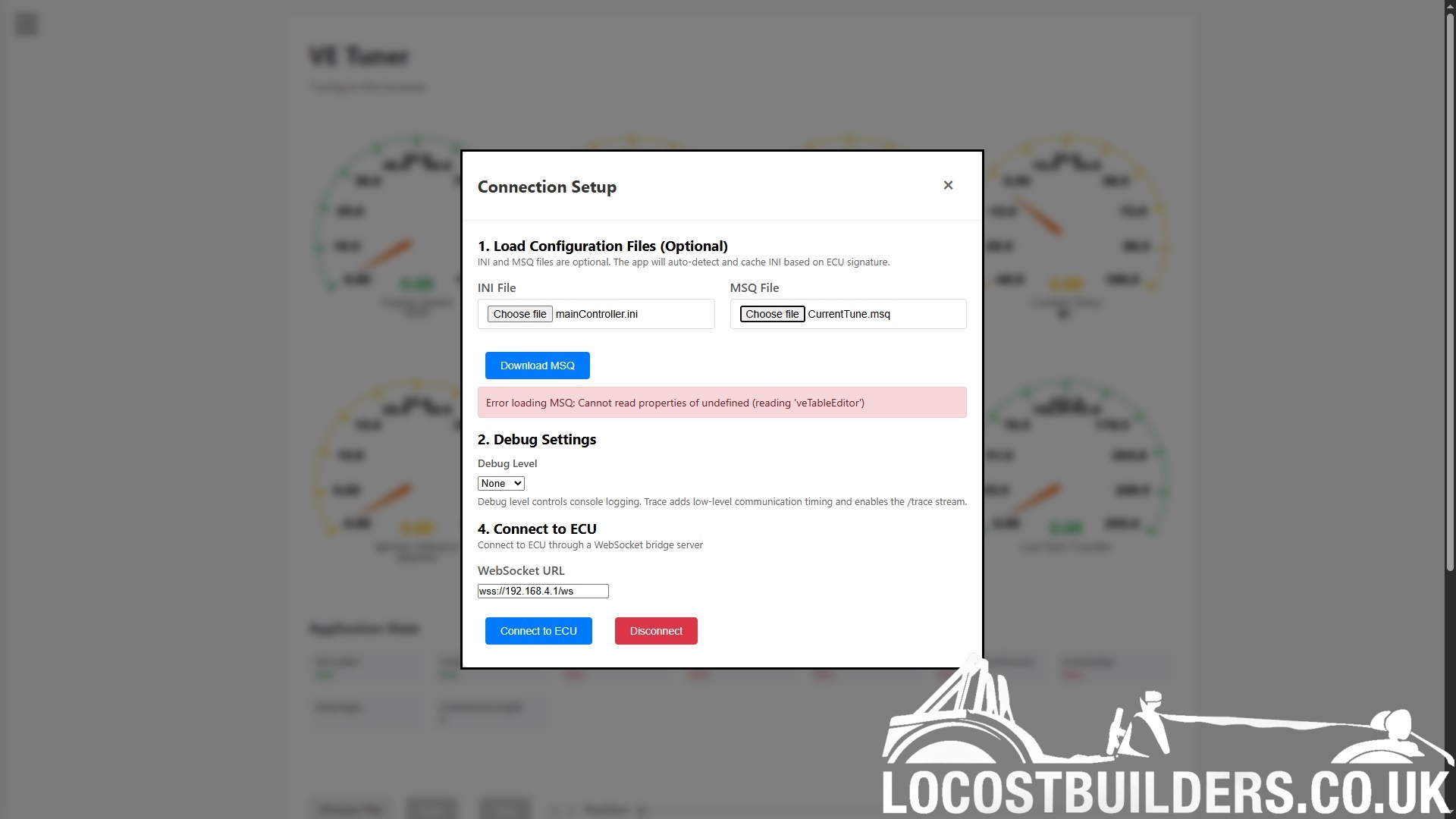
i'm using brave browser which is currently chrome 141, it is due an update but i'm waiting for a large download to finish before i can
install it.
It may just be due to the browser needing a restart before it will recognise the serial port, as it is an ftdi usb device that i've not used
since i changed to using brave browser.
Dave
Ooo, can you send me the files you were loading in please?
Regards,
David
Will do later on, I'll also give it a go on my desktop PC and see if it plays better.
Dave
I've had a go, if i load in the ms1 ini and msq files I get the same error, but if I then refresh the page and click on the connection setup they
now come up in green and appear to have the correct values in all the menu options.
I've tried the files I sent you initially and get the same sort of error, again with a refresh it sorts itself out OK.
I didn't spot that the serial port selection is only available after clicking event log then ve tabs then connect serial in the ve analysis area
that appears. i didn't have much luck with the ms1 as it is 9600 baud and there is no way to configure this within the connection setup, 115200
baud should be fine with the ms2 when I get a chance to try it with the car though.
My serial port is pre configured for 9600 baud in windows, I don't know if the web api is overriding this or is just trying to connect at 115200
baud regardless.
Dave
Love youre giving this a go and fully support it. However just want to mention if this isn't a labour of love but born out of need ..... there was a couple of years ago someone writing a replacement for tunerstudio that was web based. He seemed to get quite far. I've ducked out of speeduino so i don't know what became of it.
Busted, it's currently hardwired to 115200. Making it autoprobe the baud rate or user selectable should be straight forward.
I'm doing this as an intellectual exercise, to see how far I can take it. A bit like the cars we tinker with
You should be able to select the baud rate now.