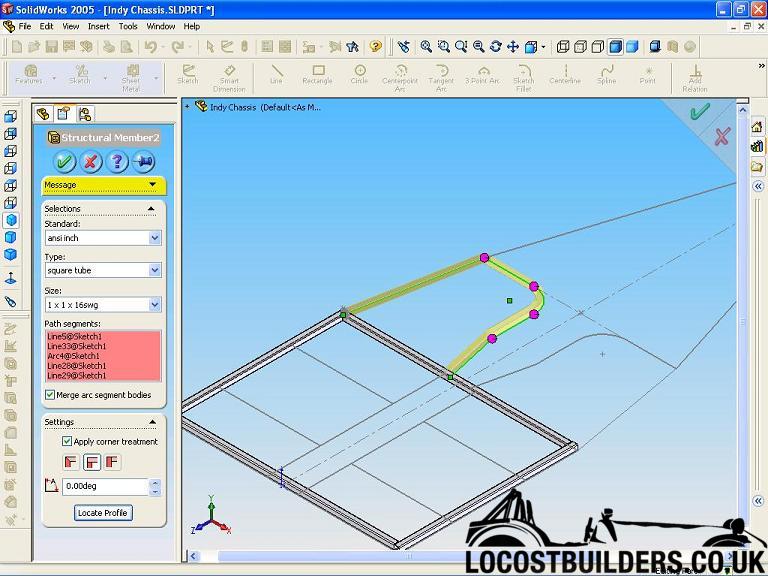
next step is to 'locate the profile' to a specific node of the profile. The pink dots are used to select the correct corner treatment. Click OK.
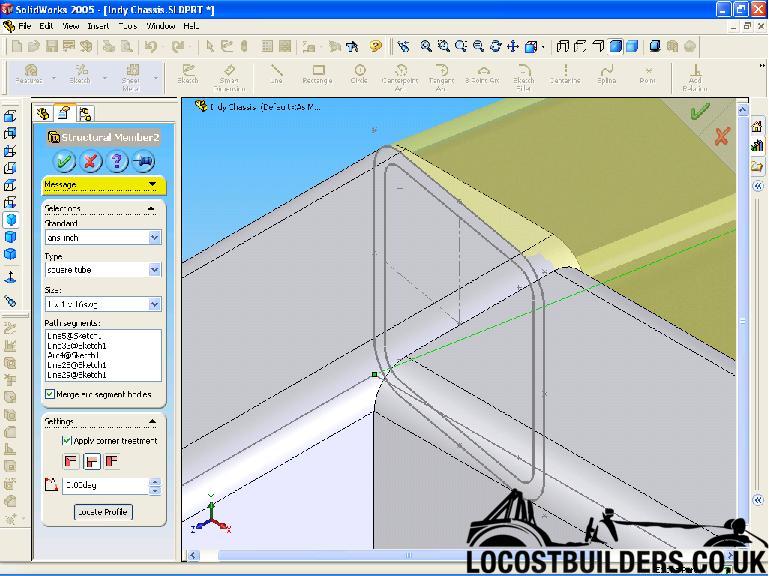
All that is left to do is trim the weldments to each other.
Easy
Dave
[Edited on 4/4/05 by Mad Dave]

hi,
so any one got any tips for modeling a space frame?
1. should I modle evry tube a seporat part and the chasy as an asembely?
2. if I modle each tube as a seporat part can I do FEA of the whole system using the built in stuff?
3. tubes I can model the tubes easely however how to I cut them when thay intersect a plain. i.e. I have a tube and I when to weld it to a plate at
say 30 degrees it is very east to make a tube that is cut of at 90 deg but not so that the tube will mate up aganst the plate.
any other genroal tips apresheated.
blake
If you do it as an assembly, the included FEA will not work, you will need to upgrade to the full version of it. (Trust me i have tried with my
assembly model imported into Solidworks!)
I made my chassis drawings as an assembly as its easier to draw that way (IMO).
To angle the ends of tubes you need to create a new workplane, and sketch on the profile you want to cut, then extrude it.
Cheers,
David
quote:
Originally posted by ceebmoj
hi,
so any one got any tips for modeling a space frame?
1. should I modle evry tube a seporat part and the chasy as an asembely?
2. if I modle each tube as a seporat part can I do FEA of the whole system using the built in stuff?
3. tubes I can model the tubes easely however how to I cut them when thay intersect a plain. i.e. I have a tube and I when to weld it to a plate at say 30 degrees it is very east to make a tube that is cut of at 90 deg but not so that the tube will mate up aganst the plate.
any other genroal tips apresheated.
blake
so I cant cut the end of a tube where it intersect another plain tube?
I can do the method you explained however I fined that if I do that I dont do it sufishently acuratly to then mate bothe ends of the tube in the
assembely
blake
hi,
thaanks for the hints I have ben using it for a cople of houres the oly problem I have been having so far is making the end cuts on tubes sufishenty
acuratly so that all the parts mate together as thay should
blake
If you use SolidWorks 2005 it is better to create a chassis as a whole using the Weldments feature. Each weldment can be 'trimmed' to the
next in various ways so you do not need to 'extrude cut' at all.
SolidWorks can produce a cut list and a seperate model of each chassis member can be created at the click of a button.
I suppose it depends on which CAD package you have but for the latest SolidWorks produce the chassis as a whole.
Dave
Aaah, someone who uses SW2005! We've not upgraded at work yet, so I can't comment on the Weldments features. By the sounds of it they are
pretty good though!
(are there any other significant improvements over SW2004? I'm trying to persuade the bosses to upgrade)
Regarding the accuracy of the cuts to make the mates accurate, then it sounds like you are editing the parts standalone, before assembling them into
an assembly.
If you edit the part within the assembly (right click on the part in the assembly, and edit part) then you should be able to perform and extruded cut
operation using the existing tube (that you want to trim the tube you are editing to fit around) as the pattern. If you sketch on the cross secton of
the existing tube (hint, try using the convert entities tool) and extrude-cut that through the tube you are editing, you should be left with a
perfectly fitting cutout.
To do that though, you must model the tube oversize, and fully constrain it in the assembly before you try to extrude a cut through it that is defined
by other geometry in the assembly. You can get into all sorts of bother if you have features defined by unconstrained geometry.
I need to find me a copy of this SW2005 to "evaluate" (!) on my PC at home!
Cheers
Andy
hi,
I hve 2005 can you explain more about the weldments?
blake
I may have found an "evaluation" copy of SW2005, so give me a few days, and I should be able to help!
Cheers
Andy
quote:
Originally posted by ceebmoj
hi,
I hve 2005 can you explain more about the weldments?
blake
hi thanks for the hints. I will have a look at the weld ments tutoreal tomorow.
blake
Weldments might sound complicated but are very simple. Draw a sketch and exit, click on the weldment tool, select the material type and click on the
sketch.
next step is to 'locate the profile' to a specific node of the profile. The pink dots are used to select the correct corner treatment.
Click OK.
All that is left to do is trim the weldments to each other.
Easy
Dave
[Edited on 4/4/05 by Mad Dave]