
fuel level setup help needed
beaver34 - 14/10/12 at 05:27 PM
hi,
i have a race technology dash 2, got everthing working fine apart from the fuel level
i put a resister inline but just one i had spare from fitting on inline for the other sensors so not sure what rating it was
here is the sender

6 bolt fitting

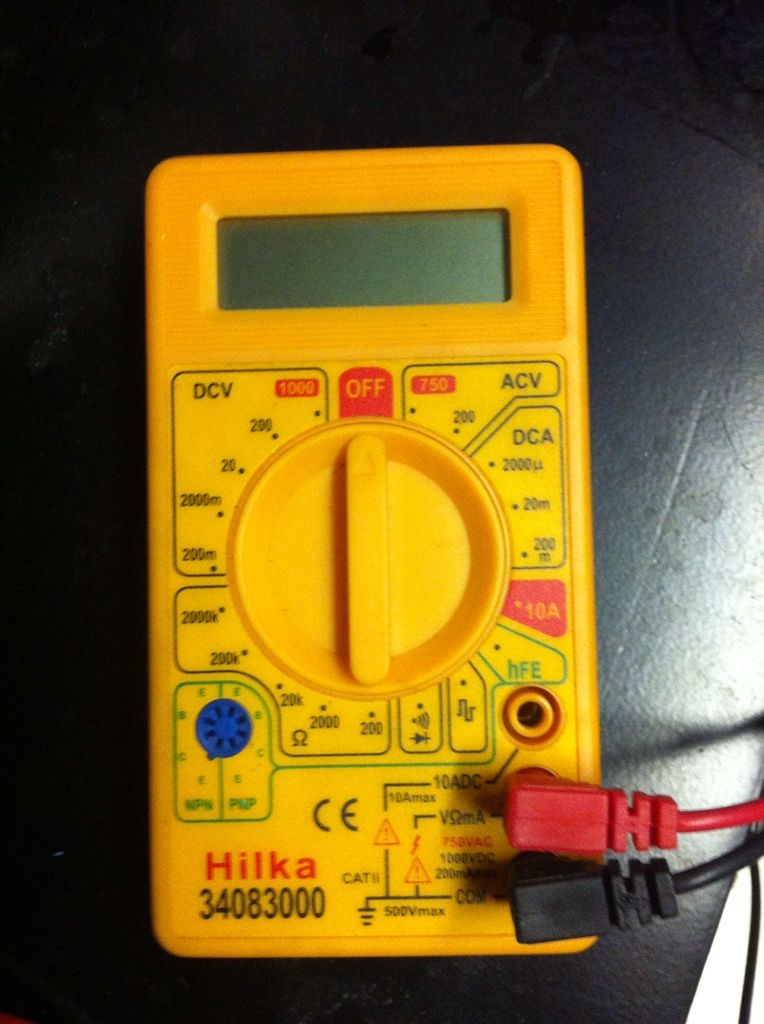
i presume i need to measure the ohm rating, what setting do i want the multimeter on to do this?
or is there better fuel level sender out there that will fit as this looks a little cheap and nasty
any help would be great as im getting fed up of getting covered in fuel messing about
thanks
blakep82 - 14/10/12 at 06:33 PM
ohms is the section on the bottom left of the meter, symbol like a horse shoe, next to the blue plug, use (i think) the 2000 range
test with the float at the top, then at the bottom
does the dash need a specific range, or can it be programmed to use any range? my 4 led gauge can be set to work on any range you see.
beaver34 - 14/10/12 at 06:35 PM
quote:
Originally posted by blakep82
ohms is the section on the bottom left of the meter, symbol like a horse shoe, next to the blue plug, use (i think) the 2000 range
test with the float at the top, then at the bottom
does the dash need a specific range, or can it be programmed to use any range? my 4 led gauge can be set to work on any range you see.
it need to see between 0 and 5v so believe i need to fit a resister to the circuit to drop the voltage down to that range
blakep82 - 14/10/12 at 06:42 PM
this is what i read from the instructions online
"Analogue inputs
The DASH2 is provided with four, fully configured, analogue input channels of its own.
These are in addition to any analogue inputs provided by connection to a data logger. These
channels may typically be used to monitor variables such as fuel level, water temperature and
oil pressure, via existing sensors. If these are not already provided, suitable items are
available from Race Technology. The sensor outputs should be connected to the DASH2
analogue input channels on Connector1, Pins 1, 5, 9 and 12, as listed in Table 1. THE
MAXIMUM INPUT VOLTAGE APPLIED TO THESE CHANNELS MUST NOT
EXCEED 15V! The input voltages will need scaling to display the correct readings for the
physical parameters being measured. This calibration is carried out using the DASH2
configuration software."
http://www.race-technology.com/upload/DASH2%20instruction%20manualv32.pdf
omega 24 v6 - 14/10/12 at 07:17 PM
The dash2 measures voltage not resistance of the sender. You need to construct ( easy ) a potential divider. You really need to read this
http://www.race-technology.com/wiki/index.php/HowDoI/Connect1Or2WireSensorToDL1
beaver34 - 14/10/12 at 07:35 PM
quote:
Originally posted by omega 24 v6
The dash2 measures voltage not resistance of the sender. You need to construct ( easy ) a potential divider. You really need to read this
http://www.race-technology.com/wiki/index.php/HowDoI/Connect1Or2WireSensorToDL1
I have and installed the wiring as per two wire diagram with a 1k resister, just now struggling how to read and programme the dash
omega 24 v6 - 14/10/12 at 07:41 PM
Dash is easily programmed using the software. We just emtied the tank and filled it bit by bit ( 5 ltrs at a time IIRC). After each 5 litres you plot
the graph and then in the box type in 5 or 10 or whatever the cumulative figure is. After the tank is full you send the info to the dash and its job
done.
beaver34 - 14/10/12 at 07:49 PM
quote:
Originally posted by omega 24 v6
Dash is easily programmed using the software. We just emtied the tank and filled it bit by bit ( 5 ltrs at a time IIRC). After each 5 litres you plot
the graph and then in the box type in 5 or 10 or whatever the cumulative figure is. After the tank is full you send the info to the dash and its job
done.
Where do you read the info from the sender to programme the dash? In dash lite?
omega 24 v6 - 14/10/12 at 07:53 PM
OH God its ben 2 years since I did it so sorry I can't remember the name of the proggrame. Came with the dash IIRC. I'll see what i can find
online. You got any screen shots of dashlite
omega 24 v6 - 14/10/12 at 08:01 PM
OK in the picture on the link below.
Select your analogue input for your fuel sender.
Then ( I think it was ) enter an equation manually.
Then you get a screen with a graph with x and y axis
Start to fill with fuel and at each point log the value on the graph
An equation should start to appear as you are doing this. It will change at each point.
After its full then save and end to dash 2 and that should be it.
Here is the link
http://www.race-technology.com/configuration_software_dash2_2_40.html
beaver34 - 14/10/12 at 08:04 PM
Dash lite is like a data logger from what I can see,
I've done the graph plotting thing for my wideband that I run into the dash so I'm good with that, just getting the correct reading to input
the fuel graph I need to sort
omega 24 v6 - 14/10/12 at 08:09 PM
you need to use the dash2 configuration software. I'm downloading it at the moment to try and remeber what i did. ( original software is on the
drivers laptop.)
OK so you "generate from a table"
the x value "volts" will change as you add fuel.
So add 5 ltrs and then in the x box type the voltage and in the y box type 5
add ten litres the x value changes type it in and then put 10 in the y box
etc etc and when its full and the values are all entered then click OK
[Edited on 14/10/12 by omega 24 v6]
omega 24 v6 - 18/10/12 at 05:10 PM
Did you make any progress yet??
beaver34 - 18/10/12 at 08:24 PM
quote:
Originally posted by omega 24 v6
Did you make any progress yet??
Yeah decided sender is naffed, not giving reliable constant reading of resistance so I have no hope calibrating it
Going to order a new item, a dip tank one I think poss the vdo one from Merlin seem a better setup than the float ones
omega 24 v6 - 18/10/12 at 08:37 PM
Are you sure you have connected it correctly. Why are you trying to measure resistance?? the dash2 measures voltage only.
beaver34 - 24/10/12 at 09:21 PM
quote:
Originally posted by omega 24 v6
Are you sure you have connected it correctly. Why are you trying to measure resistance?? the dash2 measures voltage only.
You have to have the resistance to work out the resistor needed to bring the voltage within the orrect range without drawing too much current from the
5v output
Anyway, new sender a vdo dip tank item and £2 spent on resistors has given me a fully functional dash setup
Little vid
http://www.youtube.com/watch?v=dEpeq_AG66w&feature=youtube_gdata_player
omega 24 v6 - 27/10/12 at 03:47 PM
Glad you got it working. Its a cracking bit of kit.